The Vivo Y22 may experience a screen backlight failure, causing the display to remain dark even when the phone is powered on.
Common symptoms include:
- The screen remains black while the phone is still operating.
- The device can vibrate, produce sounds, or receive calls.
- A faint image may be visible when shining a flashlight onto the screen.
- The display backlight remains off after restarting the device.
These symptoms indicate that the display assembly and backlight circuit should be inspected.
2. Vivo Y22 Motherboard Inspection Locations
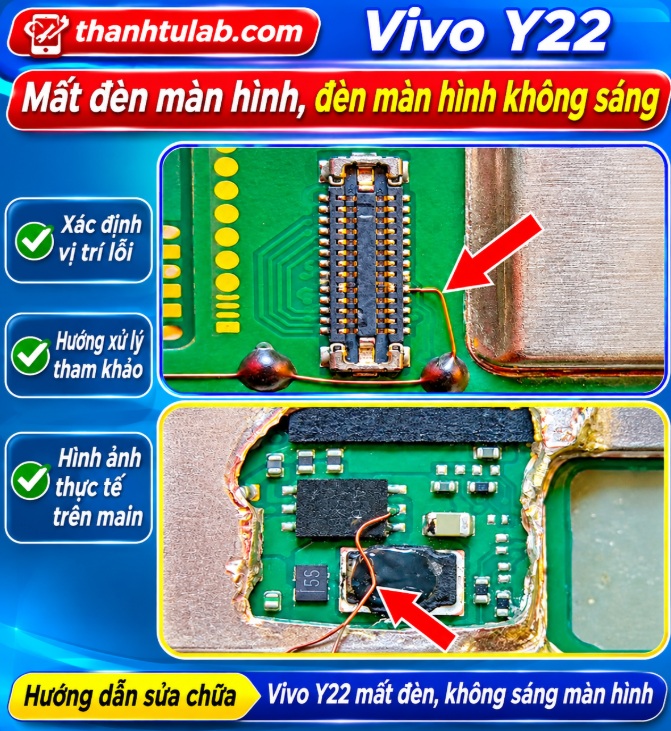
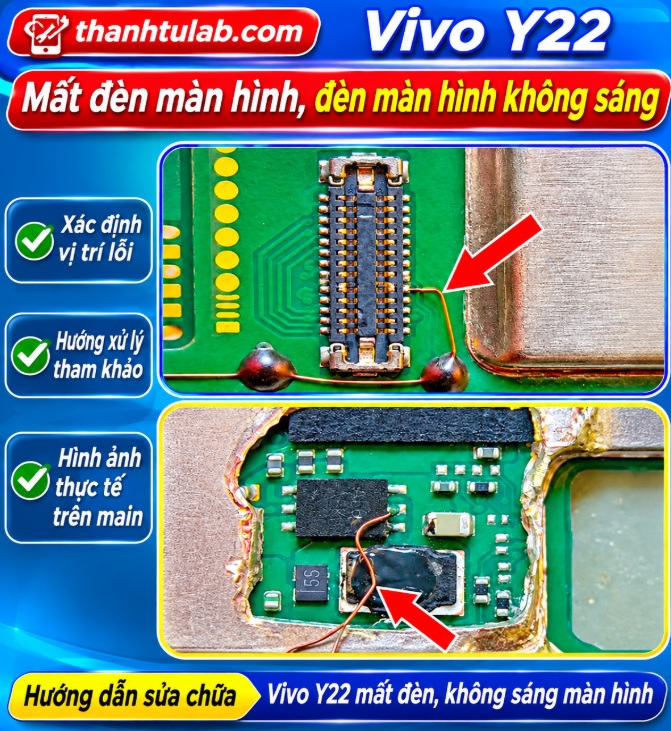
In the supplied repair reference image, two motherboard areas are highlighted with red arrows.
These locations provide visual references for inspecting the display connector, circuit connections, and components associated with the display and backlight system.
Recommended inspection steps:
Inspect the display connector and contact pins.
Check the display flex cable and its connections.
Examine the components around the highlighted locations.
Measure the backlight power supply according to the circuit diagram.
Inspect the backlight circuit components, including the driver IC, inductor, diode, and capacitors where applicable.
Check for short circuits or damaged PCB traces.
3. Suggested Repair Approach
First, test the device with a known-good display assembly to rule out a faulty screen.
Next, use a multimeter to inspect the backlight power supply and related motherboard components.
It is important to distinguish between two conditions:
Case 1: Image is visible but the backlight is not working
If a faint image can still be seen using a flashlight, focus on the backlight circuit, power supply, and associated components.
Case 2: No image is displayed at all
If no image is visible even under flashlight illumination, further inspection of the display assembly, connector, display power supply, and signal lines is required.
Identify the actual faulty component before proceeding with any replacement.
4. Post-Repair Testing
After completing the repair, check the following:
- Confirm that the screen backlight works normally.
- Verify stable screen brightness.
- Check for flickering or intermittent display issues.
- Test touchscreen functionality.
- Restart the phone and verify stable operation.
5. Conclusion
Vivo Y22 backlight failure requires careful inspection of the display assembly, connector, and motherboard backlight power circuit.
Accurate measurements and proper fault diagnosis before replacing components are essential for reliable repair results.
Website: https://thanhtulab.com
Keywords: Vivo Y22 backlight problem, Vivo Y22 backlight not working, Vivo Y22 black screen, Vivo Y22 display repair, Vivo motherboard repair.